Scan the flip. Know the coin.

PlainsMadeCo builds inventory software for coin dealers. Each app is custom built for your shop at a fixed price, starting at $1,200. Every coin you stock gets a small printed label with a QR code on its holder. Scan the label with your phone, and you'll see what you paid for the coin, what it's worth today and which box it's stored in. The app runs on your own phone and computer. You pay once with no monthly subscription, and your records never sit on someone else's server.

The demo is the complete app, filled with a made-up shop so you can try every feature before you talk to me. Anything you type in it stays on your own device.

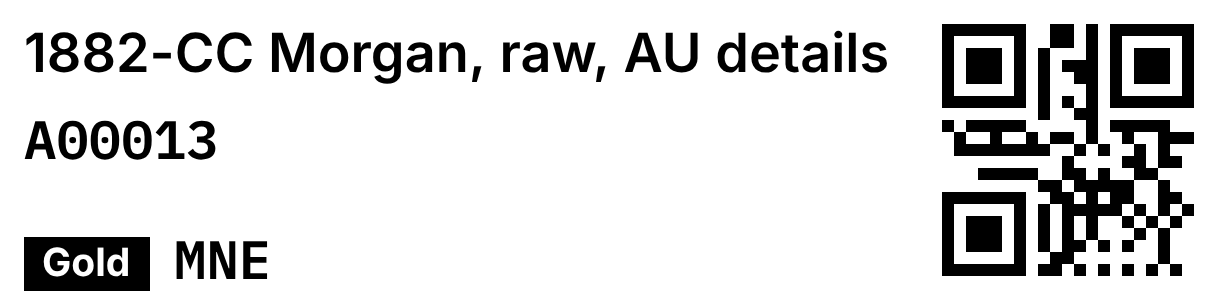
Shown at actual size. This is the exact label the app prints for this coin: its name, stock number, color tag, your cost written in your private price code, and a QR code for your phone to scan.
A00013, Gold tier
1882-CC Morgan, raw, AU details
Paid
$395.00Printed as MNE in your price code
Replacement
$425.00
Retail
$475.00
Box
Red box 1
Came from
A00001Morgan dollars, estate lot

Point your phone's camera at this square. The demo opens on this exact coin. Or tap here.

Buy a whole collection, then sort it out later.

Most inventory systems break down when you buy a collection for one lump price. You sort the coins over the next few weeks, the valuable ones get pulled out, and nobody remembers what each one actually cost you.

A00001, Morgan dollars, estate lot
What came outCoinsCost
1882-CC Morgan, raw, AUA00013, cost set by hand1$395.00
Morgans, BUA00014, even share12$436.97
Morgans, culls and holedA00015, set at $30 each20$600.00
1904-O Morgan, choice BUA00016, cost set by hand1$90.00
Still in the lotnow $37.55 each66$2,478.03
Paid for the lot100$4,000.00

Here's an example. You pay $4,000 for a hundred Morgan dollars, which works out to $40 each. A week later you find a Carson City Morgan in the pile and decide it cost you $395. If the other 99 coins stay at $40 each, your records now add up to $4,355, which is $355 more than you actually paid. Every profit number after that is off, and you'd have no way of knowing by how much.

The app fixes this by moving the cost along with the coin. When you pull a coin out of a lot, you give it the cost you think is fair, and the coins still in the lot share whatever is left. If you leave the cost blank, the coin takes an equal share.

No matter how you sort a lot, the coins always add back up to exactly what you paid, down to the cent.

Lots bought by face value work the same way. If you pull a Barber half out of a $250 face value bag of junk silver, the bag keeps the rest of the cost. You can undo any split, and every coin remembers which lot it came from.

Everything your counter needs, in one app.

The app was built and tested around how a real dealer works: buying coins on a phone, selling at a coin show table and listing on Whatnot at night. Every feature below is working in the demo right now.

See where your business stands the moment you open it.

The first screen shows the numbers you'd normally work out on a calculator: what your stock cost you, what it would cost to replace, what sold in the last 30 days and how much you kept after fees.

  • Four values on every coin: what you paid, what a dealer would pay you for it today (liquidation), what it would cost to buy again (replacement) and your asking price (retail). Bullion values can update with the spot price automatically.
  • The spot price is saved with every purchase, so you can always see where gold and silver were on the day you bought.
  • Filters that show what needs doing: coins that need a label, coins not yet put in a box, coins waiting to be graded and coins you've held too long.
  • A "Hide what I paid" button takes your costs off the screen when a customer can see it.
The stock screen on a computer: $33,865 at cost, $37,490 replacement, $4,228 sold in 30 days, a chart of holdings since July and a grid of coins and lots with SKUs and boxes.

Labels that print right the first time.

Labels print on the thermal label printer you already own. Each label runs along the bottom edge of a 2x2 coin holder, 24 labels fit on a 4x6 sheet, and the screen shows how much of each coin size a label will cover before you print.

  • Your cost, in your own code. Pick any ten letter word with no repeated letters, and the app prints your cost in it. You can read it, but a customer across the table can't.
  • Labels for boxes, too. Scan a box label and you'll see everything stored inside it.
  • A printer test sheet. Print it and measure one square to check your printer before you label two hundred coins.
  • Label sheets saved at your printer's exact size, so they come out right when you print from your phone.
The Labels screen: an edge strip label shown on a 2x2 flip, coin size buttons from cent to dollar, the coins waiting for labels, and a Make label sheets button.

Scan a coin, sell it, and move on to the next one.

In sell mode the camera stays open. Scan a coin's label, type the price, choose where it sold, and you're ready for the next coin. The app subtracts the right fees for each place you sell, so Whatnot, coin shows and your counter each show what you actually kept.

  • A warning as you type if your price drops below the lowest you'd normally accept.
  • Sell part of a lot, and the app shows the price per coin or per dollar of face value.
  • Numbered receipts with your shop's name, printed on the same label printer.
  • One-tap Excel exports of your current stock, your full inventory or every sale.
A coin on a phone: 1882-CC Morgan with paid, liquidation, replacement, retail, melt and days owned, and Sell, Edit and Print a label buttons.
The sell sheet on a phone: paid, replacement and retail, a Sold for box, a channel picker set to Whatnot and Save sale.

Use your phone and computer without losing anything.

Buy on your phone and sell from your computer. To keep them in sync, one device saves a file and the other opens it, and the work from both is combined. The app only asks you to decide something when both devices changed the same coin.

  • Every change saves instantly. Refreshing the page or closing the tab won't lose anything.
  • One button makes a dated backup, photos included, and the app reminds you when it's been too long since the last one.
  • The last five days of copies stay on your device, so you can undo a mistake even without a backup file.
  • Sold coins are saved to a file before they're cleared from the list, so your sales history is never lost.
The Sales screen: the last 30 days sold for, fees, what was kept and gain over cost, split by Whatnot, in person and coin show, with a monthly chart and every sale listed.

Try it yourself in five minutes.

Sell a coin, split a lot, print a sheet of labels, then undo it all. The demo is a made-up shop with about thirty items, and nothing you do in it leaves your device.

Open the live demo

Smaller tools for busy shops.

Not every shop needs a whole new inventory system. Some just need one tedious job taken off the counter. I've built label and scrap tools for a busy retail coin shop that runs on QuickBooks. They work alongside QuickBooks without changing anything in it. If your shop has a job like this, tell me about it on a free call and I'll give you a fixed price before any work starts.

  • Purchase stickers from a QuickBooks export. Import your purchase report, and every item gets a color based on its cost. Each color prints as its own batch.
  • A sticker that folds over the top of the coin holder. The description goes on the front. The barcode, purchase order number, date and cost go on the back, printed upside down so they read correctly when you flip the holder over.
  • Barcodes sized to your printer, at 203 or 300 dpi, so every barcode prints cleanly and scans the first time.
  • Labels for scrap gold bags showing karat and net weight, plus a packing list when they ship.
  • Silver content filled in from the year, so a 1964 quarter (90% silver) and a 1965 quarter (no silver) are always recorded correctly.

Try it: make a sticker

Pick a coin size to see its sticker on a 2x2 holder at actual size, then choose a barcode or a QR code.

  1. NStart a new sticker.
  2. Alt+4Pick Quarter.
  3. 1964 Type the year, press Enter. It prints.
  4. 1958-D Type the next one, press Enter.
  5. 1941-S Same again. Done.

On a Mac, Alt is the Option key. Each new sticker keeps the coin type, purchase order and date from the last one, so you only type the year. The app can also tell a barcode scanner apart from a person typing, so it never prints by accident.

Tested carefully, because it holds your inventory.

Every update comes with notes on what changed and a written record of how it was tested. When a bug is found, a test is added for it so it can't come back.

110test runs on phone and computer screens before every update goes out
4,000rounds of random buying, selling and splitting across two devices, with zero failures
$0.00lost or added by mistake in any test. Every run checks that the numbers balance to the cent
10 yrsof records tested: 15,000 items and 30,000 sales still save in about two seconds

How a build goes.

Here's exactly what happens from the first call to the finished app. You'll never be billed for work you didn't approve.

  1. We talk for half an hour

    You tell me how you track inventory now and what slows you down the most. I'll ask a lot of questions. The call is free, and you're under no obligation.

  2. I write down what I heard

    I send you a short write-up of the problem as I understood it and exactly what I'd build. If I got anything wrong, this is the easy time to fix it.

  3. You agree to a fixed number

    We sign a short written agreement. You pay half up front and half when it's delivered. If you want something added later, I'll quote it before I start.

  4. Four weeks from your sample data

    The four weeks start when you send me twenty or thirty real items from your stock, not when you sign. That way I build around your actual inventory instead of guessing.

  5. We go through it together

    We go through the finished app together on your own phone and printer. Anything broken or wrong gets fixed free.

Websites for your shop.

I also build websites for coin shops. There are two options, depending on how much you want online. Both follow the same steps as the app: a fixed price agreed up front, half paid to start, and the rest only after you've seen it working.

What you should know before you buy.

Your data stays yours. Your records live on your own phone or computer, and I never see them. If you stop working with me, the app keeps working and nothing is held back from you.

No subscription on the app. You pay once for the build, and it keeps working with no monthly fee. Monthly support is optional. Websites are the one exception: they need a server, so they have a monthly fee for hosting and upkeep. I never take a cut of your sales.

Price guide data isn't included. Published price guides are licensed, so putting them in the app would break their rules. You enter your own values or import a file you already have.

Your devices share a file, not a cloud account. That keeps your inventory off other people's servers. It also means a device you never back up holds the only copy, so the app regularly reminds you to save a backup.

Backups are your responsibility. I build the backup buttons and reminders, and I'll show you how they work. I can't recover a copy you never made.

You work directly with me. There's no support desk. You text or email the person who built your app and get a quick answer. That's why I only take on a few projects at a time.

Tools for collectors, too.

If you collect coins rather than sell them, I also make smaller tools for tracking one person's collection or stack. I sell them on Etsy, they're built to the same standard as the dealer software, and you can try each one in your browser right now with nothing to install.

Coin Collection Tracker showing market value, cost basis, unrealized gain, melt percentage and a filterable list of coins.

Coin Collection Tracker

Log your coins by series, year and mint mark. It calculates silver weight, flags key dates and shows how much your collection is worth above melt value. If it can't tell a variety apart, it says so instead of guessing.

Covers 46 series and passed 294 tests

Bullion Stack Tracker showing stack value, cost basis, return percentage and a break-even panel.

Bullion Stack Tracker

Track coins, bars, rounds and junk silver in one place. It calculates melt value from each piece's purity and shows the spot price each metal needs to reach for you to break even.

Covers 4 metals and passed 335 tests

Roll Hunt Ledger showing logged bank box hunts, hit rate and cost per silver coin.

Roll Hunt Ledger

Log each box of coins you search from the bank, and see how often you find silver and what each find really costs you. It comes with a matching Excel workbook that gives the same results.

Passed 696 checks, with a matching Excel workbook

My Etsy shop also has a Junk Silver Calculator and a Paper Money Tracker that spots collectible serial numbers. All purchases go through Etsy, so you're covered by Etsy's buyer protection. If you just need a quick number, try the free junk silver melt value calculator.

"The product has so many features that it makes this new hobby for me even more enjoyable and makes me more informed... I'd give this company 10 stars if I could."

★★★★★ Thomas, on Etsy

"I emailed him asking if he could do an edit to add a few columns for some coin variations. Within an hour or less he recreated the entire spreadsheet."

★★★★★ Nick, on Etsy

"Fantastic product. Just what I've been looking for. Customer service was great. He contacted me right away with assistance."

★★★★★ linda, on Etsy

Questions about the collector tools

What file do I actually get?

Each tool is a single HTML file. There's no installer, app store or account. It opens like a web page, but everything runs on your own computer.

Does it work on Mac and Windows?

Yes. Anything with a modern browser works: Chrome, Edge, Safari, Firefox. It's the same file either way.

Do I need to be online?

No. Once it's downloaded it runs with your wifi off. Nothing you type is sent anywhere, because there's no server involved.

What if I lose the file?

Etsy keeps every purchase in your downloads, so you can grab the app again any time. Your records are separate: they live on your own device, so press the backup button now and then and keep that file somewhere safe. That backup is what brings your collection back.